TuneLush-Offline Music Player
- 4.4
- Rating
- 100.00K
- Installs
- Free
- Price

 Analysis by App-foxy
I spent time with TuneLush-Offline Music Player as a local music tool rather than treating it like a streaming service. That distinction matters immediately: the app is built around music already stored on the device, then adds playlists, lyrics, and a local scan to make that collection easier to use. For anyone who wants a straightforward way to play personal files without depending on a connection, that focus is appealing.
My overall impression is that TuneLush is most useful when I want to open my own library and start listening quickly. It does not ask me to discover an online catalog or manage a subscription before music becomes available. At the same time, its offline design means the experience depends heavily on how tidy and complete my local collection is. If most of your listening happens through streaming platforms, this will feel more like a companion player than a replacement.
How TuneLush feels in everyday use
I focus on the small choices that make a local player easier to live with: whether I can prepare a useful queue before leaving, and whether a playlist saves me from searching while I’m busy. Those habits matter most when the phone is already in my hand for something else. From there, the next section looks at the situations where TuneLush’s offline approach is especially practical.
You May Also Like

 Blood Strike: 2.5 Anniversary
Blood Strike’s Loadouts Turn Every Drop Into a Tactical Gamble
A close look at Blood Strike’s custom loadouts: how fast access to signature weapons reshapes its battle royale rhythm, rewards preparation, and narrows the gap between fights.

 Pandora - Music & Podcasts
Pandora’s Music Is Easy to Start, but Harder to Recover
Pandora’s strength is its low-effort path from a seed to a station. Its weak spot is how much confidence it asks you to place in connection, setup, and quiet recovery.

 8 Ball Pool
 Is Built on Rivalries, Rematches, and Routine
A close look at the rivalries, rematches, shared routines, and unanswered safety questions that turn a quick pool match into a persistent mobile community.

 Samsung Music
’s Quiet Strength Is Playing What You Already Own
Its reach comes less from spectacle than from dependable access to a personal library. That simplicity is both the app’s strongest retention engine and its ceiling.

 AccuWeather: Weather Radar
AccuWeather Review: A Quick, Clear Forecast for Everyday Decisions
For everyday plans, the best forecast is the one you can understand quickly. AccuWeather makes rain timing, radar, and local conditions easy to act on, with a few trade-offs.

 Hill Climb Racing
Why Hill Climb Racing Still Turns Crashes Into One More Run
A tiny car, a bumpy hill and one more upgrade: Hill Climb Racing keeps resurfacing because its simple chaos makes every near-miss feel personal.
More From Our News Desk



Readability and navigation for a local library
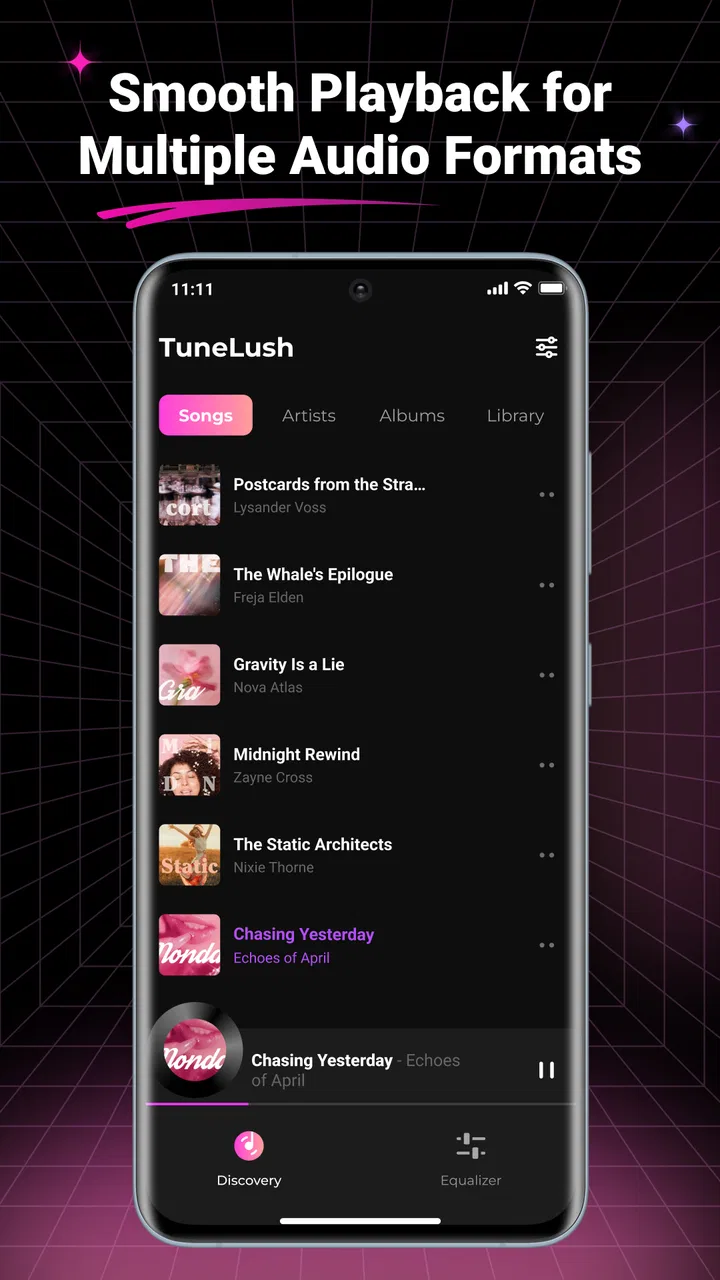
The central idea is easy to understand: scan the music saved on the phone, browse it, and play it. That simple path is one of the app’s strongest qualities. I do not have to work through an online home page filled with recommendations before reaching my own albums. For a person who prefers a focused interface, the local-first approach can reduce visual clutter and unnecessary decisions.
The app’s store summary highlights offline playback, playlists, lyrics, and local scanning, and those four elements describe the practical workflow well. The scan is especially important because a local player is only useful when it can recognize the files I actually keep on the device. After that, playlists provide a more intentional way to organize listening than repeatedly searching through folders or an all-songs view.
I found the concept suitable for listeners who already know what they want to hear. A carefully arranged playlist can make the app comfortable for a commute, a workout, or a quiet evening without requiring repeated navigation. Someone with a large, messy collection may need to spend more time preparing files and playlists before the experience becomes smooth. That is not a flaw unique to TuneLush, but it is more noticeable here than in services that automatically organize a cloud catalog.
Lyrics add another layer to the player. They can make the app more useful when I want to follow a song rather than simply let it play in the background. They also give the interface a more engaging purpose for listeners who enjoy singing along or checking words while listening. I would still approach lyrics as a convenience inside the player, not as a reason to expect the breadth or consistency of a dedicated lyrics service.
For readability, the most helpful habit is to keep playlists short and descriptive instead of creating many nearly identical lists. A playlist named for a clear activity or mood is easier to recognize at a glance than one built from a long, ambiguous title. This is a small organizational choice, but it matters for people who want to make decisions quickly or who find dense music libraries tiring to scan.
Motor and sensory considerations
Music players are often used with one hand, while walking, cooking, commuting, or reaching for the phone from a pocket. TuneLush’s offline purpose supports that kind of quick access because I can prepare listening in advance rather than perform several network-dependent steps at the moment I need music. The practical benefit is less about advanced accessibility tooling and more about reducing the number of tasks required during a busy moment.
Playlists can also help users who find repeated searching physically or mentally demanding. Instead of locating individual tracks every time, I can create a predictable route through familiar music. That makes the app a better fit for routine-based listening. A person who relies on a small set of albums might find this especially comfortable, while someone who constantly changes between a huge number of songs may experience more browsing effort.
The visual side is more dependent on the device and the user’s own preferences. I would not assume that a local music player automatically offers large controls, high-contrast presentation, screen-reader optimization, or other specialized support. Anyone who needs those things should test the actual interface on their phone and check how the operating system’s own display and interaction settings work with it. The responsible conclusion is that TuneLush can be convenient, but it should not be treated as a certified accessibility solution.
Lyrics can be helpful for people who prefer visual reinforcement while listening, but they can also add information to an already busy player screen. If I am using the app mainly as background audio, I may prefer to stay with the basic playback view and avoid unnecessary visual attention. On the other hand, a listener who benefits from reading along may find that lyrics turn a passive listening session into a more active and understandable one.
There is also a sensory advantage to keeping music offline: the listening environment is more predictable. I am not interrupted by a changing recommendation feed, connection warnings, or the need to wait for a track to load from a remote service. That does not make the app universally calmer, since the phone’s notifications and other system sounds remain separate concerns, but it gives the music library itself a more controlled role.
Situational access: where the offline design makes sense
The clearest everyday scenario is a commute through places where reception is unreliable. I can scan the collection at home, put several tracks into a playlist, and then leave with a listening plan that does not depend on mobile coverage. The same workflow suits travel, underground routes, rural areas, or any situation where I want to avoid using a connection for music I already own.
Another useful case is conserving attention. When I am working, reading, or doing household tasks, I may want familiar music without being tempted by endless online discovery. TuneLush keeps the session tied to my own files. That can be a genuine advantage for people who want music to support an activity rather than become the activity.
Local playback is also practical for personal recordings, downloaded tracks, or collections that are not available through mainstream streaming services. A cloud platform may have a larger general catalog, but it cannot always be the best home for unusual, privately collected, or personally organized audio. TuneLush gives those files a dedicated place in the listening routine.
For families or shared devices, the Everyone content rating makes the app broadly approachable from an age-classification perspective. That does not tell me what every locally stored song contains, of course; the content comes from the user’s own collection. The important distinction is that the app itself is positioned as a general-purpose music tool rather than an age-restricted entertainment product.
I also see value for people who dislike accounts and recurring services. TuneLush is free, and its local model means the starting point is the music already on the device rather than a paid catalog. That makes it easy to try without committing financially. The trade-off is that I must supply and maintain the music myself, so the app cannot replace the convenience of a service that handles discovery, storage, and catalog management for me.
What the local scan changes in the workflow
The local scan is more than a small setup step. It determines whether the app feels like a usable library or merely a basic file player. My practical advice is to treat scanning as part of library maintenance: keep file names and folders reasonably clear, remove duplicates when possible, and check that the music you want is actually stored on the device. A carefully prepared collection will make TuneLush feel much more capable than an unorganized one.
This is one of the less obvious trade-offs of the app. Local control gives me independence from a service, but it also transfers responsibility to me. If a track is missing, incorrectly labeled, or stored somewhere the player does not recognize, the solution is likely to involve the collection itself rather than a recommendation setting. That is manageable for organized listeners, but frustrating for anyone who expects automatic catalog cleanup.
Playlists are most effective when I use them as access shortcuts rather than permanent archives of every song. For example, one playlist for a regular journey and another for concentration can reduce the need to browse by album each time. This is particularly useful when I want a predictable sequence and have limited time or attention. It also gives users with different preferences in the same household an easier way to separate listening choices on one device.
Lyrics can be used as a deliberate accessibility aid in a broad, informal sense: reading along may help some listeners follow a song more comfortably than relying on audio alone. But I would not build an important workflow around lyrics without first checking how well the particular tracks are supported. Their usefulness may vary with the files and the way the app handles them, so I see this as a welcome feature rather than a guaranteed solution for every listener.
How it compares with streaming players and basic file browsers
Compared with a streaming service, TuneLush gives up instant access to a large online catalog and personalized discovery. In return, it offers a more contained experience centered on local music. I would choose TuneLush when I already have the tracks I want, care about offline reliability, or prefer not to make music listening dependent on an online account. I would choose streaming when discovery, broad availability, synchronized libraries, and automatic recommendations matter more.
Compared with a basic file browser, the advantage is the music-specific structure. A file manager can open audio files, but it is not necessarily designed around playlists, lyrics, and a dedicated playback routine. TuneLush makes more sense when I want my stored music to feel like a library rather than a collection of documents. The difference is modest for someone who only plays a single file occasionally, but meaningful for regular listening.
It also occupies a middle ground between a simple offline player and a full-featured music ecosystem. The app’s appeal comes from restraint: it focuses on local playback instead of trying to become an online social platform or a complete media subscription. That focus is valuable, although users searching for extensive synchronization, discovery tools, or advanced library management may find a more established alternative better suited to them.
Remaining barriers and points of friction
The biggest barrier is the requirement to have music available locally. New users who expect to search for artists and stream immediately may open the app and wonder why their preferred catalog is not already there. The answer is built into the product’s identity: this is a player for device-stored music. It rewards preparation, but it does not remove the work of obtaining and organizing that music.
Storage is another practical consideration. Keeping a large collection on a phone uses space, and offline convenience can become less attractive when the device is already close to full. A streaming service may be better for someone who wants to keep the local footprint small. Conversely, a listener with a modest collection may appreciate having everything available without depending on a network.
There is also a learning curve around local organization. The scan sounds simple, but the quality of the final library depends on the files the user brings into it. Poorly named tracks, missing artwork, inconsistent album information, or duplicate files can make browsing less pleasant. TuneLush can provide the playback environment, but it cannot turn an untidy collection into a perfectly curated catalog by itself.
Users with specific motor, visual, hearing, or cognitive needs should evaluate the app in their own environment rather than relying on the category label alone. System-level tools may improve the experience, but compatibility can differ between devices and configurations. I would pay particular attention to whether the controls are easy to locate, whether lyrics are comfortable to read, and whether the navigation remains understandable when the collection grows.
People who need synchronized progress across several devices may also prefer a cloud-based alternative. TuneLush’s local emphasis is excellent for independence on one phone, but that same independence can become a limitation when listening habits span multiple devices. The right choice depends on whether control over local files is more important than continuity between platforms.
Who should use it, and who should look elsewhere
I would recommend TuneLush to listeners who maintain their own music files, want a free offline player, and appreciate having playlists and lyrics in one focused tool. It is also a sensible option for anyone who regularly travels through weak-signal areas or wants to avoid turning every listening session into an online browsing experience.
I would be more cautious about recommending it to someone whose music life is built almost entirely around streaming. If your priority is discovering unfamiliar artists, accessing a huge catalog instantly, or receiving automatic recommendations, TuneLush will not offer the same kind of convenience. A streaming app will probably be the better primary player, with TuneLush serving only as a separate home for local files.
The app comes from Motasemviedo dev and is currently at version 1.0.6. I regard that as a reason to keep expectations practical: the core experience should be judged by how well local scanning, playback, playlists, and lyrics fit your routine, not by assuming it will match every mature music ecosystem. Its free price makes experimentation easy, especially for users who already have a small collection ready to test.
It has reached over one hundred thousand installs, with an average rating of 4.4 from around one hundred twenty ratings and ten reviews. Those figures suggest that the concept has found an audience, but they should not replace personal testing. A local music player can feel excellent with one person’s collection and awkward with another’s, particularly when file organization and accessibility preferences differ.
My inclusive verdict on TuneLush
TuneLush works best when simplicity, offline access, and personal control matter more than online discovery. I like the way its scan, playlists, and lyrics support a clear local-listening routine. The app can reduce the number of steps between opening a phone and hearing familiar music, which is useful in noisy, busy, disconnected, or attention-sensitive situations.
Its inclusive value comes mainly from flexibility of context rather than a long list of specialized claims. A prepared playlist can help someone avoid repeated searching; offline playback can support travel and unreliable connectivity; lyrics can offer a visual way to engage with songs; and local files can preserve access to music outside a streaming catalog. These are practical strengths, but they do not guarantee that every user will find the controls or presentation comfortable.
I would install it if I wanted a free home for music already stored on my device, especially for commutes and other predictable routines. Before relying on it heavily, I would scan a representative part of my collection, build a couple of playlists, open the lyrics view, and test the controls using the phone settings I normally depend on. That short trial reveals more than a general rating because it shows whether the app fits my files, my hands, my eyes, and my listening habits.
In the end, TuneLush is not trying to win by replacing every kind of music app. Its strongest argument is narrower and more useful: it gives local music a dedicated, playlist-friendly, lyric-aware playback space without charging for the basic experience. If that matches the way you listen, it is an easy app to try. If you need a complete online catalog or highly specialized accessibility support, I would look at alternatives first and keep this one as a possible offline companion.
FAQs for TuneLush-Offline Music Player
01What is TuneLush-Offline Music Player, and how does it work?
TuneLush-Offline Music Player is designed for listening to music stored locally on your Android or iOS device without relying on a constant internet connection. After adding compatible audio files to the app or making them available through your device’s storage, you can browse your library, create playlists, and play songs offline. It is best suited to users who already own music files rather than those looking for a streaming catalog.
02Can I use TuneLush without mobile data or Wi-Fi?
Yes, the main attraction of TuneLush is offline playback. Once your music files have been imported or are accessible in the app, songs can generally be played without mobile data or Wi-Fi, which is useful during flights, commutes, travel, or in areas with poor coverage. Internet access may still be required for optional features, updates, advertisements, cloud-based services, or downloading music from another source.
03Does TuneLush include free music or a built-in streaming service?
TuneLush should not be treated as a replacement for services such as Spotify, Apple Music, or YouTube Music. Its focus is playing music that you provide, so the available songs depend on the audio files already stored on your device or transferred through supported methods. Users should also remember that downloading copyrighted music without permission may violate copyright laws and the terms of the original content provider.
04What audio formats and playback features does TuneLush support?
Support can vary depending on the version of TuneLush and the operating system, so checking the app’s current store description is recommended before downloading a large music collection. In general, an offline player is expected to handle common formats and provide essentials such as play, pause, skip, repeat, shuffle, playlists, and background playback. Less common formats, advanced equalizers, or gapless playback may not work equally on every device.
05Is TuneLush safe to download, and what permissions should I expect?
Download TuneLush from the official Google Play Store or Apple App Store whenever possible, and verify the developer name, ratings, update history, and privacy information before installing. The app may request access to music files or media storage so it can find and play your songs. Review any additional permissions carefully, especially network, notification, or tracking-related requests, and avoid unofficial APK files that could contain modified or harmful software.
Pros
- Plays downloaded music without requiring an internet connection.
- Keeps mobile data usage low during everyday listening.
- Offers uninterrupted playback in airplane mode or weak-signal areas.
- Simple interface makes browsing local tracks quick and convenient.
- Useful for listeners who prefer storing their music directly on the device.
Cons
- Requires music files to be downloaded or transferred beforehand.
- Available features may vary between Android and iOS versions.
- Large music libraries can use significant phone storage space.
- Limited appeal if you mainly stream music from online services.
- Some advanced playback or library tools may require extra setup.

TuneLush-Offline Music Player
Gallery